Storage Overview
GitSec stores your encrypted backups either on GitSec's managed infrastructure or on your own storage provider (BYOS — Bring Your Own Storage).
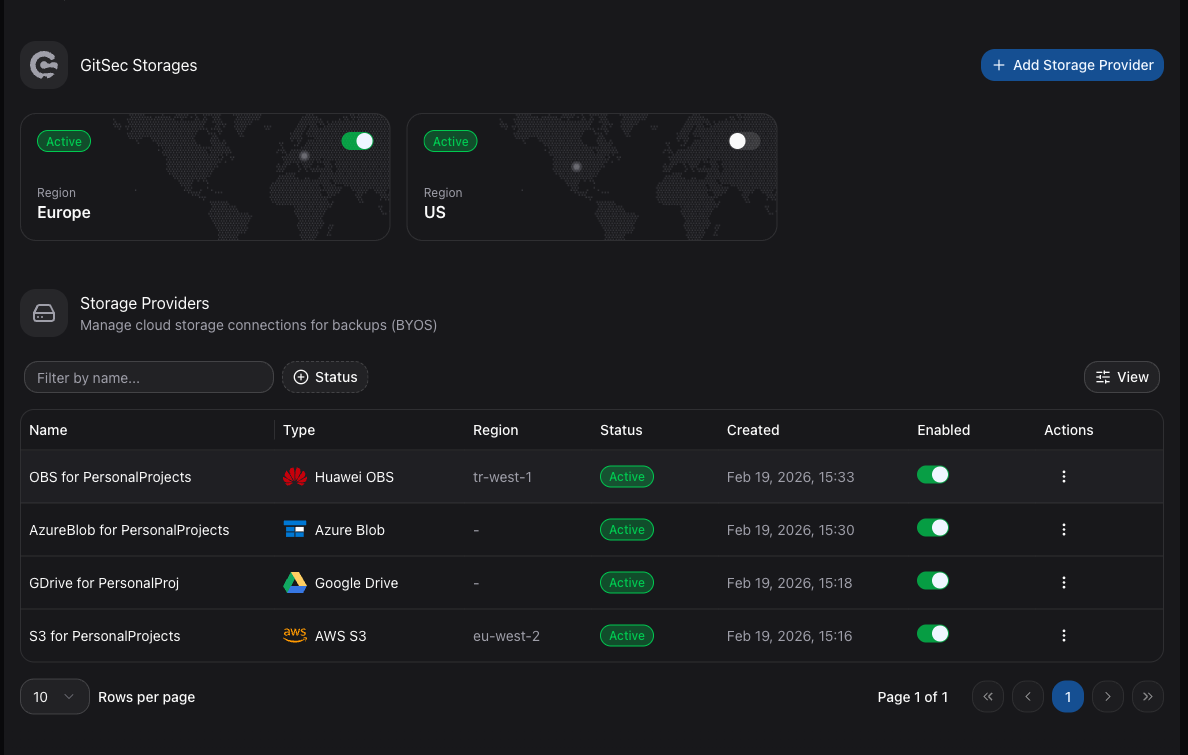
Storage Options
| Option | Description |
|---|---|
| GitSec Storage | Managed, encrypted storage hosted by GitSec in EU and US regions. |
| BYOS | Connect your own cloud storage: AWS S3, Azure Blob, Google Drive, or Huawei OBS. |
Storage Page
Navigate to Storage in the sidebar to manage your storage configuration. The page is divided into two sections:
GitSec Storages
Shows the built-in GitSec storage regions available to your account. See GitSec Storage for details.
Storage Providers (BYOS)
Lists all external storage providers you have connected. From here you can:
- View connection details and status.
- Add a new storage provider.
- Remove an existing provider.
Adding a Storage Provider
Click the Add Storage Provider button to see all supported providers:
| Provider | Status |
|---|---|
| AWS S3 | Available |
| Azure Blob Storage | Available |
| Google Drive | Available |
| OneDrive Personal | Coming Soon |
| OneDrive Business | Coming Soon |
| Huawei OBS | Available |
Click on a provider card to begin the setup process.