Activity
The Activity page shows the status of all backup and restore jobs across your repositories.
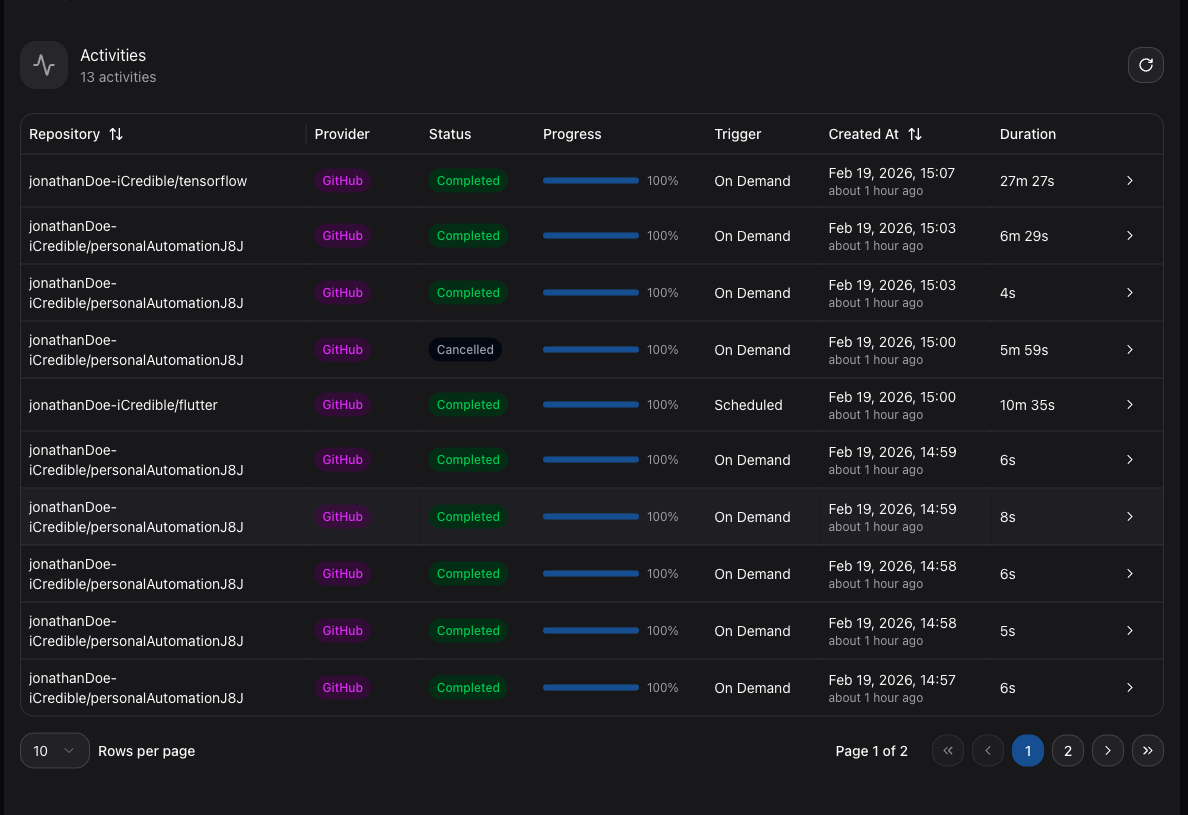
Activity Page
Navigate to Activity in the sidebar to view a comprehensive list of all operations. Each entry shows:
| Column | Description |
|---|---|
| Status | The current state of the job (running, success, or failed). |
| Repository | The repository the operation belongs to. |
| Operation | Backup or Restore. |
| Trigger | How the job was initiated: On Demand, Scheduled, or Push Event. |
| Progress | A progress bar showing completion percentage for running jobs. |
| Start Time | When the job started. |
| Finish Time | When the job completed (if finished). |
Filtering
The activity list is paginated and can be filtered to find specific operations. Use the available controls to narrow results by status, repository, or trigger type.
Per-Repository Activity
You can also view activity for a specific repository from the Activity tab on the repository detail page. This shows only the jobs related to that repository.
Troubleshooting Failed Jobs
If a job shows a failed status:
- Check the error details in the activity entry.
- Verify that your Git provider app installation is still active.
- Ensure your storage provider is reachable and properly configured.
- For push event backups, verify the webhook is correctly registered.
- Retry the operation by triggering a new on-demand backup.