Schedulers Overview
Schedulers let you automate backups on a recurring basis. Instead of manually triggering backups, configure a scheduler and GitSec will handle the rest.
Scheduler Types
| Type | Description |
|---|---|
| Minutely | Runs at a specified minute interval. |
| Hourly | Runs at a specified hour interval. |
| Daily | Runs once per day at a specified time. |
| Weekly | Runs once per week on a specified day and time. |
| Monthly | Runs once per month on a specified day and time. |
| Custom (CRON) | Runs on a fully customizable schedule using a CRON expression. |
Global Schedulers Page
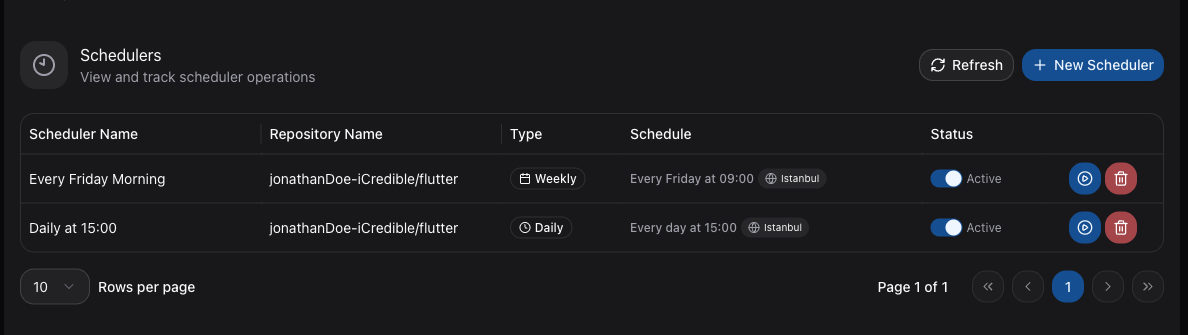
Navigate to Schedulers in the sidebar to view all schedulers across your repositories. The table shows:
| Column | Description |
|---|---|
| Name | The scheduler label. |
| Repository | The repository this scheduler is configured for. |
| Type | Minutely, Hourly, Daily, Weekly, Monthly, or Custom (CRON). |
| Time | The scheduled time of day. |
| Timezone | The timezone for the schedule. |
| Status | Active or Inactive. |
Active vs. Inactive
Each scheduler has a toggle to enable or disable it:
- Active — The scheduler will trigger backups at the configured time.
- Inactive — The scheduler is paused and will not trigger any backups until re-enabled.
This lets you temporarily pause automated backups without deleting the scheduler configuration.
Per-Repository Schedulers
You can also view and manage schedulers from the Scheduler tab on any repository detail page. This shows only the schedulers configured for that specific repository.